Monday, June 8, 2015

Differences between Bootstrap and Foundation Responsive UI Development Frameworks

It is too hard to make a decision that which one is better as both are awesome. It is completely and opinionated question and I will put my views about both in points that I have observed in my 3-4 years of experience of Responsive Website Designing.

I am using both but undoubtedly Bootstrap more. There are few points I want to put here and surely they will help you in deciding which framework is useful for your website or application. Although you can use any framework for any type of UI development yet below given points will help you a lot.
                                               
Note: I am not giving my views in context of 'which is better?'

1.     Bootstraps support LESS and SASS both while Foundation supports SASS only.
2.     Foundation has little better navigation and design CSS than the Bootstrap as I felt.
3.     Bootstrap is from well know brand i.e. Twitter while Foundation is from Zurb and obviously it is not as popular as Twitter
4.     Both supports 12 column grids
5.     Foundation has more identical names for its grid class such as small-2, large-4, medium-6 while Bootstrap offers col-md-6, col-xs-2, col-sm-3, col-lg-4 (not making a big difference)
6.     When it comes to deal with Tables then Bootstrap is better than Foundation as Bootstrap offers horizontal scrolling for small screens
7.     In Foundation there is feature 'Kitchen Sink' that I like most it helps us in making sure that all the features of Foundation work smoothly when they are going to be used together
8.     If you are Rails programmer than Foundation gives you a rock solid feature to integrate it with your Rails application while Bootstrap not
9.     Both frameworks offer good installation options using Bower and NPM
10. These both frameworks are completely customizable. You can customize it completely before downloading the project files and even after that too

There are a number of common and unique features in both of the Frameworks. It’s totally depends how you use them to make your projects coming out with all the features. There is not obvious and big reason to ignore any framework over other. Both are very powerful with few exceptions that I gave in points above.

I have developed so many websites using both of the frameworks. Both offer a huge library of CSS selectors, JavaScript components, and Dynamic CSS to manage your large size projects easily.

ADMEC Multimedia is the professional and Advanceweb design institute for responsive web designing in Delhi. We offer full courses in Responsive Web Design course through which we train students.

Tuesday, June 2, 2015

Functions in JavaScript

Functions in JavaScript are one of the most important building blocks to know to become a master of JavaScript. Yesterday when I was teaching function in JavaScript to one of my batch then I thought to write something on it.

I think understanding of JavaScript becomes more important in JavaScript than any other programming in the world because JavaScript supports prototypical architecture of doing programming and prototypical approach can only be managed if you know JavaScript's functions in depth.

JavaScript can be written in a HTML page as browser understands it very well. You can make a separate JavaScript file and attach that in HTML using <script type="text/javascript" src=""></script> tag too.

Have a look on the following given JavaScript code please: 

function main(){
    alert('hello Ravi');
}
    //calling the function
    //main(); //you will get an alert when you will refresh your html page.
    //calling main() function on onclick event
    document.getElementById('mydiv').onclick = main;

Note: Don't use parenthesis () after the main function when you are calling a function on onclick event because function will not wait for the onclick event and it will be executed as you will load the html page.

How to pass parameters to a Function
Function's parameter is a way to make a function reusable and flexible. In the following example of code I have passed a parameter to main function and after that I have called twice and you can notice that you will get two different results while we have one function.

Function's parameter is a way to make a function reusable and flexible. In the following example of code I have passed a parameter to main function and after that I have called twice and you can notice that you will get two different results while we have one function.

Example 1:
function main(param){
    alert(param);
}
main('hello Ravi');// hello Ravi
main('hello admec multimedia institute');//hello admec multimedia institute

Example 2:
function main(param1, param2){
    return 'Hello '+param1+'\n Happy to meet you '+param2;
}
alert(main('Ravi', 'again'));
confirm(main('admec multimedia institute', 'first time'));
//document.getElementById('mydiv').onclick = main;// you will get error here*
//document.getElementById('mydiv2').onclick = main;// you will get error here*

*Why Error: As I set two parameters in main function and when you will call the function then surely you need to pass their values too and if I will pass the values then I need to add the parentheses () just next to the main function. But when I will add them then function will not wait for the onclick event as I said earlier and it will be called automatically as you will refresh the page. So the best way to handle this situation is the use of anonymous function. See the example below

document.getElementById('mydiv').onclick = function (){
    alert(main('Ravi', 'again'));
}
document.getElementById('mydiv2').onclick = function (){
        this.innerHTML = main('admec multimedia institute', 'first time');
}

Use of return in Function

return makes a function more flexible and reusable. If you want to display the results coming from a function on multiple locations then always use return in your function. See the below given example please: 

function main(param1, param2){
    return 'Hello '+param1+'\n Happy to meet you '+param2;
}


document.getElementById('mydiv').onclick = function (){
    alert(main('Ravi', 'again'));
}
document.getElementById('mydiv2').onclick = function (){
        this.innerHTML = main('admec multimedia institute', 'first time');
}

Managing Scope in Functions

Scopes in JavaScript are two types of: 
1. Global 
2. Local. 
When you declare any variable and function inside a function then that is in local scope of that function meaning you can only and only access those variables and functions inside that function only.

See the following example; the function nested is accessing all the variables and parameters whether they are inside its parent function or outside of that.
var global = 5;
function main(param1, param2)
{
    var parentLocal = 6;
    function nested(arg1){
        var childLocal = 3;
        return     param1 + param2 + arg1 + global + parentLocal + childLocal;
    }
    return nested(30);
}

alert(main(10,20));

Note: Scope in JavaScript runs from bottom to top.

Interested students can complete JavaScript training online from ADMEC Multimedia Institute.


Monday, June 1, 2015

What is the use of Filters in Photoshop

When someone learns the Photoshop in an institute then he or she always wish to learn an option with eager i.e. filters in Photoshop. Most of us have a great excitement too for the filters in Photoshop to learn. Depending on which filters you apply and which settings you choose, the results can range from a subtle change to a total morph. You can make an image look (almost) as if it is hand painted, silk-screened, or sketched, distorted, patterned, textured, or noised. The creative possibilities are infinite. Start using the Filter Gallery; you’ll see ... time will fly by.

For applying filters, including using the Filter Gallery and Smart Filters, and use filters to make a photo look like an oil painting or tinted drawing.

A small handful of them, such as Clouds and Blur, are apply in one step simply by choosing the filter name from a sub-menu on the Filter menu. If apply a filter to a Smart Object, it becomes an editable, removable Smart Filter.

The current document color mode or bit depth. All the Photoshop filters are available for RGB files, most of the filters are available for Gray-scale files, fewer are available for CMYK Color, Lab Color, and 16-bits-per-channel files, still fewer are available for 32-bits-per-channel files, and none are available for Bitmap and Indexed Color files.

To use the Filter Gallery

  1. Click an image layer; or for more flexibility, click a duplicate image layer or a Smart Object.
  2. Optional: To limit the filter to a specific area of the image, create a selection.
  3. The Foreground and/or Background colors are used by many filters and you must choose those colors now, before opening the Filter Gallery.
  4. Choose Filter from Filter Gallery. The resizable gallery opens. 
  5. To change the zoom level for the preview, click the Zoom Out button (Ctrl - ) or Zoom In button (Ctrl +) in the lower-left corner of the dialog, or choose a preset zoom level from the menu.  
  6. In the middle pane of the dialog, click an arrowhead to expand any of the six filter categories, and then click a filter thumbnail.
  7. Choose a filter name from the menu below the Cancel button.
  8. On the right side of the dialog, choose settings for the filter. 
  9. To edit the list of effects (bottom right portion of the dialog), do any of these optional steps: 
  10. To apply an additional filter effect, click the New Effect Layer button, click a filter thumbnail in any category, and then choose settings. The effect may take a moment or two to process.
  11. To replace one filter effect with another, click a filter effect name on the scroll list (don’t click the New Effect Layer button), then choose a replacement filter and settings.
  12. To hide a filter effect, click the visibility icon next to the effect name (click again to re-display).
  13. To change the stacking position of a filter effect to produce a different result in the image, drag the effect name upward or downward on the list.
  14. To remove a filter effect from the list, click it, then click the Delete Effect Layer button.
  15. Click OK.

Creating and editing Smart Filters

When apply a filter to a Smart Object, it becomes what is called a Smart Filter. We can edit or remove a Smart Filter at any time, apply multiple filters to the same Smart Object, hide individual filters while keeping others visible, and move or copy filters from one Smart Object to another. We can also edit the filter mask, change the stacking order of the filters, and edit the Smart Object itself.
The file formats that support Photoshop layers—such as PSD, PDF, and TIFF—also support Smart Filters. Some third-party (non-Adobe) filters can also be applied as Smart Filters.

To apply a Smart Filter

Click an image layer, then choose Filter > Convert for Smart Filters (or right-click the layer and choose Convert to Smart Object). If an alert appears, click OK.

Optional: Create a selection to control which area of the image the filter affects. Apply a filter Smart Filters listing, mask thumbnail, and filter listing will appear on the Layers panel.
The most significant advantage to using Smart Filters is that you can edit the filter settings at any time.

Working with the Smart Filter mask

When apply a filter to a Smart Object, a filter mask appears on the layer automatically. If create a selection before applying the first filter to a Smart Object, the selection will appear as the white area in the mask. A filter mask can also be edited using the same methods as for a layer mask. For an illustration of how this works, see the next two pages.

To edit a filter mask

  1. Click the filter mask thumbnail.
  2. Do either of the following: 

        Click the Brush tool, and then apply strokes with black to hide the filter effect, or with      white to reveal areas you've hidden. For a partial mask, use black and lower the tool opacity. To hide the filter effect gradually from one side of the image to the other, click the Gradient tool, and then drag across the image..

  • To display the filter mask by itself in the document, Alt-click/Option-click the mask; repeat to re-display the full Smart Object.
  • To soften the transition between black and white areas in a filter mask, click the filter mask thumbnail, then on the Properties panel, adjust the Feather value. To control the overall opacity of the mask, use the Density slider.
Filters are most fascinating thing among the designers who use Adobe Photoshop. Now filters are editable after you apply them on any of the layer. I remember till Photoshop 7 they were not editable meaning once you applied you couldn't delete or edit them. There are a plenty of third party filters available to be used by designers too.

ADMEC Multimedia Institute provides photo editing courses online Delhi. Students can also join Online Computer Classes.


Wednesday, May 27, 2015

Explaining 2-D in AutoCAD

2-D stand for two- dimension. It means any object which stand only in two- dimension like length and width only are two -dimensional object.
In Auto CAD the dimension which is used is width and height only.This object has zero thickness means they are flat. Square, Circles, triangles are some common example of two-dimensional objects.
     1. Rectangle
     2. Circle
     3. Triangle
     4. Line
     5. Pentagon
     6. Hexagon
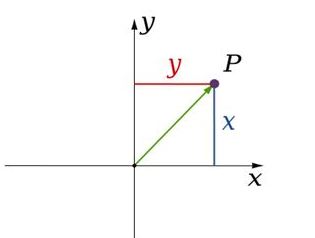
Now we understand the two -dimensional object, so continue to two- dimensional coordinate system. In geometry when every point is represented by two coordinate, then it means it is in two -dimensional space. These coordinate are the distances from two references lines.
These lines are called axis. The coordinate axis is perpendicular to each other and their meeting point is known as origin. They are usually labeled as 'X' and 'Y'.
There are basically two coordinate system:-
1. Cartesian coordinate system
2. Polar coordinate system
1. Cartesian coordinate system: Relative to axis the position of any point in two- dimensional space is given by an ordered pair of real numbers. Each number giving the distance of that point from the origin measured along the given axis, which is equal to the distance of that point from the other axis. The coordinate can also be defined as the positions of the perpendicular projection of the point onto the two axis expressed as signed distances from the origin.
                                      2d
                                              (Cartesian coordinate system)
2. Polar coordinate system: The polar coordinate system is a two- dimensional coordinate system in which each point is determined by a distance from a reference point and an angle from a references direction. The reference point is called the pole and the ray from the pole is the references direction in the polar axis. The distance from the pole is called the radial coordinate or radius and the angle is the angular coordinate, polar angle or azimuth.
                                        3d
                                                   (Polar Coordinate System)
 Auto CAD provides both the system so we can design two - dimensional object which helps of both coordinate system.
Now we understand about the two- dimensional space and also space system. So, I am going to ask you a question that is it possible to any object that it can exist in two dimensional spaces? Then the answer will be no, because every object have their height. Whether its height is in meter or nanometer but it cannot be zero. So an object with zero height does not exist in real space. But a three - dimensional object can be represent into a two- dimensional space. For this we use isometric view. Isometric view is visually representing three dimensional objects in two dimensions space system. It is a projection in which the three coordinates axis appear equally and the angle between any two of them are 1200.   
                                           b
                                              (Isometric view of different shapes)
The representation system is only 2 dimensions but we can see the height also, but it is not actually there. So for references we can say that a plane sheet of paper is a two - dimensional space and object drawn on it is two dimensional objects. 
Finding a Best institute for AutoCAD Training in Delhi is very tough as there are many AutoCAD institutes who make fake promises. Students can join ADMEC Multimedia Institute which provides two month specialized course of AutoCAD.

Thursday, May 21, 2015

Importance of AutoCAD in Professional Architecture Design ..!!

Now a day’s AutoCAD is popular name in the field of 2D and 3D computer-aided design (CAD). Basically AutoCAD is commercial software application which is used in the 2D, 3D and drafting. In this time AutoCAD is used in architecture, construction, graphic design and lots of other professional projects are being development with the help of AutoCAD. AutoCAD introduces software tools for accurate idea during interior and exterior designing of a commercial building, showroom, bridge, office, hotel, and construction.

           In this time everyone wants an attractive and praise worthy look for his/her residential or commercial building. So to accomplish it they need to go to the professional interior or exterior designer for the suggestion of look of their house or office.

So, it is necessary for a professional interior or exterior designer to proper knowledge of AutoCAD, so that he/she can better planning of the color effects, space, design, fabrics, and styles etc. Along with these things a main important things is Budget which is most important for anyone during the designing of house. A professional architecture designer is that one who can able to give better look in minimum budget.


Lots of AutoCAD training institute in Delhi provides training in AutoCAD but few of them only discuss the all plans which are necessary for a professional architecture designer like floor plans, architectural details, electrical plans, ceiling plans, elevation, sectioning, and furniture plans. ADMEC is a well-known professional training institute in the field of AutoCAD, which also guides its students about all above-mentioned points. The best thing about its training is its assessment and evaluation procedure that is admirable seriously; I suggest you to visit their center or call them at 9811-8181-22 for more detail.

Wednesday, May 20, 2015

Importance of Graphic design in last few years

India is the country of diversity of religions, cultures, and geography and this variation in all gives it a variety of different-2 arts, dressing senses, and festivals; in result you can easily find millions of creative thinkers, creative analysts, and creative enthusiastic persons in all over the country. After the incarnation of the computer; design industries have got a big change in its way of doing it. Artists are always having a sharp eye for the detail and accuracy in their works and so computer is the only tool remains for them.

In result, the demand for graphic designers and graphic design training centers and institute has grown up rapidly in last few years. No company can survive without a graphic designer, no product can be sold out with a graphic designer, no company can set itself as a successful and established brand with a graphic designer, no bank can do its business without a graphic designer these are just few examples on how a graphic designer is important.

You can easily notice hundreds of thousands of hoardings, pamphlets, boards, books, newspapers, catalogues, websites, TV commercials etc around you, these all designed by a graphic designer.

To become a good graphic designer you need to learn few things.

1. Computer designing applications such as CorelDraw, Photoshop, GIMP (an open source Photoshop alternative), In Design, Illustrator, QuarkXPress, Acrobat Reader etc.

2. You must have very good knowledge of design theory such as:

·         Design principles
·         Design Elements
·         Colors Indications
·         Colors Schemes
·         Typography Anatomy
·         Typography Classifications
·         Lay-outing Principles
·         Lay-outing Terminologies
·         Shapes and their uses
·         Types of Layouts
·         Grid Systems

You can click on this link to read more about on Graphic Designing Theory.

3. Sketching and Illustrations helps you in planning and storyboarding. Storyboarding is a most important part that comes at initial stage when you design something.


If you belong to Delhi, in India or want to come to Delhi then there is a very good and professional institute for GraphicDesign Training in Delhi i.e. ADMEC Multimedia Institute. This institute have highly professional teaching methodology with a sound evaluation process to make you a certify professionals in the field of graphic designing training.

Tuesday, May 19, 2015

How to Get a Reliable Web Design institute in Delhi ?

When thinking of a web design institutes Delhi, you have numerous options but the real challenge comes when you have to select the best from lots of institutes. Choosing the right institute for web designing is very important because IT (Information Technology) industry is growing day by day in our country in results demand for the quality websites is also increasing with a slight demand for mature and professional web designers. 

Almost all the organizations, businesses, small to large companies, educational institutes, retail enterprise, branded shops etc are looking for websites and E-Commerce portals to extend their business among the people as much as possible.

Web Design, to put it simply, is, "planning and creation of websites” which is user friendly that’s includes website architecture, layout, website fonts, color combinations, theme, images, header, and footer. By bringing all mentioned elements together; a web designer creates a website. It’s also a job for a web designer to make his/her website popular out of the other millions of the websites which is running on the Internet. So it's very crucial for you to select the web design institutes Delhi.

Some of the things that a web designer must understand are:

Photoshop
JavaScript
jQuery
CSS3
HTML5
DHTML
Dynamic CSS
LESS
SASS
Grid Systems
Emulators
Twitter Bootstrap
Information Architecture
Server Management

These are some essential topics which must be understood which are very helpful during designing a website. A proper designed website is very effective in SERP (Search Engine Result Pages) like Google, Yahoo, and Bing. A well designed website also helps in attracting the viewers or customers to the website and it is very helpful in raising their interest for it so that they can stay longer on the website. 

I agree that it is a herculean task to find out a good institute for web designing in Delhi. I would like to refer you an institute i.e. ADMEC Multimedia; It is a one of the best web design and development institutes in Delhi.

Featured Post

ADMEC Multimedia Institute Scholarship Program

The ADMEC Multimedia Institute scholarship program aims to select and trained talented non working female, married woman and non married m...