Showing posts with label AutoCAD training institute in Delhi. Show all posts

Friday, June 19, 2015

Commands and Terminologies used in AutoCAD to show the Home Screen of AutoCAD

There are the following commands and terminologies shows the Home screen of AutoCAD is: 
  • Application Button: These buttons displays command for printing, saving, utilities etc
  • Quick Access Toolbar: This id for access to command like New, open, save plot
  • Search bar: Search for text in our drawing
  • Ribbon: The Ribbon has most of the commands that we can use while working
  • Tabs: A series of Tabs make up the ribbon (Home, Insert, Manage etc) and organize the tools into common groups.
  • Panel: Contain group of tools
  • Tools: These are the icons that start the commands use to draw, modify etc 
  • Drawing Space: This is where you draw yours design.
  • Command line: This is the place where we can type a command, AutoCAD uses this space to ‘prompt’ you for information. This also helps to tell us what to do next while using the command.
  • Status Bar: This allows seeing the change different mode of drawing such as Ortho, Osnap, Grid, Otrack etc.
Workspace: This program will allow us to work in different work spaces depending upon what we are working. Like its look different while we are doing 2D and 3D modelling.

Basic Drawing Tools used in Drafting:
  • Construction Line: It’s a line of infinite length which will be prepared on X-axis or Y-axis. “XL” is a shortcut command for the same.
  • Poly line: It is made of numerous line/arc/or both segmented together into one selectable object. “PL” is a shortcut for the same.
  • Polygon: They are regular, multi sided shapes such as pentagons, hexagons etc.
  • Rectangle: This is a quick way of drawing a four segment poly line with four right angle. “REC” is a shortcut command for the same.
  • Arc: An arc is a circle segment. When using this tool the we can define the arc by selecting three points through which software generate an arc.
  • Circle: The only variables are radius and center point.”C” is a shortcut command for the same.
  • Spline: They are a particular form of curve generated by specific mathematical equation. We can select as many vertices as we wish. Splines are generally used for cosmetic purposes, as their mathematical complexity makes them hard to define from technical design. “SPL” is a shortcut command for the same.
  • Ellipse: It is oval in shape and requires a radius to be defined for both their vertical and horizontal components. “EL” is a shortcut command for the same.
  • Hatch: They are area fills. They can be made up of solid color, a gradient or a specific pattern. It can be applied on any enclosed area.
  • Text: AutoCAD uses two forms of text entry, single line and multi line. These are known respectively as DTEXT and MTEXT.
AutoCAD save file in DWG format but import and export from different formats like DXF, IGES etc.3

The drawing can be prepared with the help of layers as it can be a large piece of clear plastic on which or a part or whole drawing is made. It can be controlled by the layer properties manager button located on the object properties toolbar.

We can also modify drawing by use Cut, Copy, Erase Array command.


Wednesday, May 27, 2015

Explaining 2-D in AutoCAD

2-D stand for two- dimension. It means any object which stand only in two- dimension like length and width only are two -dimensional object.
In Auto CAD the dimension which is used is width and height only.This object has zero thickness means they are flat. Square, Circles, triangles are some common example of two-dimensional objects.
     1. Rectangle
     2. Circle
     3. Triangle
     4. Line
     5. Pentagon
     6. Hexagon
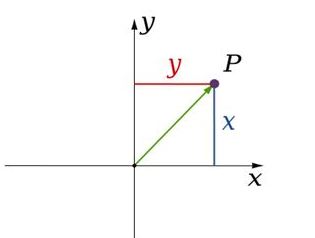
Now we understand the two -dimensional object, so continue to two- dimensional coordinate system. In geometry when every point is represented by two coordinate, then it means it is in two -dimensional space. These coordinate are the distances from two references lines.
These lines are called axis. The coordinate axis is perpendicular to each other and their meeting point is known as origin. They are usually labeled as 'X' and 'Y'.
There are basically two coordinate system:-
1. Cartesian coordinate system
2. Polar coordinate system
1. Cartesian coordinate system: Relative to axis the position of any point in two- dimensional space is given by an ordered pair of real numbers. Each number giving the distance of that point from the origin measured along the given axis, which is equal to the distance of that point from the other axis. The coordinate can also be defined as the positions of the perpendicular projection of the point onto the two axis expressed as signed distances from the origin.
                                      2d
                                              (Cartesian coordinate system)
2. Polar coordinate system: The polar coordinate system is a two- dimensional coordinate system in which each point is determined by a distance from a reference point and an angle from a references direction. The reference point is called the pole and the ray from the pole is the references direction in the polar axis. The distance from the pole is called the radial coordinate or radius and the angle is the angular coordinate, polar angle or azimuth.
                                        3d
                                                   (Polar Coordinate System)
 Auto CAD provides both the system so we can design two - dimensional object which helps of both coordinate system.
Now we understand about the two- dimensional space and also space system. So, I am going to ask you a question that is it possible to any object that it can exist in two dimensional spaces? Then the answer will be no, because every object have their height. Whether its height is in meter or nanometer but it cannot be zero. So an object with zero height does not exist in real space. But a three - dimensional object can be represent into a two- dimensional space. For this we use isometric view. Isometric view is visually representing three dimensional objects in two dimensions space system. It is a projection in which the three coordinates axis appear equally and the angle between any two of them are 1200.   
                                           b
                                              (Isometric view of different shapes)
The representation system is only 2 dimensions but we can see the height also, but it is not actually there. So for references we can say that a plane sheet of paper is a two - dimensional space and object drawn on it is two dimensional objects. 
Finding a Best institute for AutoCAD Training in Delhi is very tough as there are many AutoCAD institutes who make fake promises. Students can join ADMEC Multimedia Institute which provides two month specialized course of AutoCAD.

Thursday, May 21, 2015

Importance of AutoCAD in Professional Architecture Design ..!!

Now a day’s AutoCAD is popular name in the field of 2D and 3D computer-aided design (CAD). Basically AutoCAD is commercial software application which is used in the 2D, 3D and drafting. In this time AutoCAD is used in architecture, construction, graphic design and lots of other professional projects are being development with the help of AutoCAD. AutoCAD introduces software tools for accurate idea during interior and exterior designing of a commercial building, showroom, bridge, office, hotel, and construction.

           In this time everyone wants an attractive and praise worthy look for his/her residential or commercial building. So to accomplish it they need to go to the professional interior or exterior designer for the suggestion of look of their house or office.

So, it is necessary for a professional interior or exterior designer to proper knowledge of AutoCAD, so that he/she can better planning of the color effects, space, design, fabrics, and styles etc. Along with these things a main important things is Budget which is most important for anyone during the designing of house. A professional architecture designer is that one who can able to give better look in minimum budget.


Lots of AutoCAD training institute in Delhi provides training in AutoCAD but few of them only discuss the all plans which are necessary for a professional architecture designer like floor plans, architectural details, electrical plans, ceiling plans, elevation, sectioning, and furniture plans. ADMEC is a well-known professional training institute in the field of AutoCAD, which also guides its students about all above-mentioned points. The best thing about its training is its assessment and evaluation procedure that is admirable seriously; I suggest you to visit their center or call them at 9811-8181-22 for more detail.

Featured Post

ADMEC Multimedia Institute Scholarship Program

The ADMEC Multimedia Institute scholarship program aims to select and trained talented non working female, married woman and non married m...