Autodesk 3ds Max is a well-known and leading 3d software that generates professional 3D modelling and rendering projects and has plentiful functionalities for providing quick animation and graphic rendition. It was initially known as 3d Studio in the year of 1988. Now we all know it as Autodesk 3ds Max since it was developed by Autodesk in 2009. Gradually it has become an indispensable tool that one need to comprehend for the enhancement of their career. For be a master of this application joining an advanced 3ds Max course in Delhi is highly recommended by experts.
ADMEC Multimedia is a leading institute and ISO Certified center in Delhi. It is a leading institute in the multimedia industry for the professional and practical training for the training of Web Designing, Web Development, 3D Animation, Graphic Designing, Advertising Designing, Video Editing, Visual Effects, Motion Graphics, SEO, Architecture & Interior Designing, AutoCAD etc.
Showing posts with label CAD. Show all posts
Tuesday, November 20, 2018
How to Create a walk through in Max?
Autodesk 3ds Max is a well-known and leading 3d software that generates professional 3D modelling and rendering projects and has plentiful functionalities for providing quick animation and graphic rendition. It was initially known as 3d Studio in the year of 1988. Now we all know it as Autodesk 3ds Max since it was developed by Autodesk in 2009. Gradually it has become an indispensable tool that one need to comprehend for the enhancement of their career. For be a master of this application joining an advanced 3ds Max course in Delhi is highly recommended by experts.
Tuesday, September 4, 2018
USE OF VISUAL STYLES IN AUTOCAD
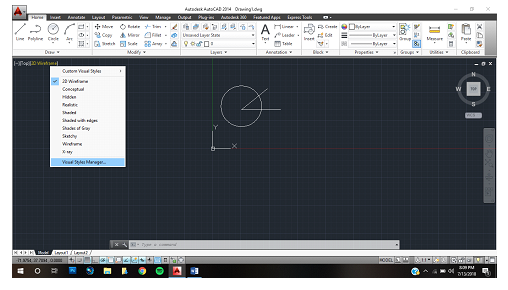
AutoCAD introduced a feature known as Visual styles in AutoCAD 2007. The main purpose of Visual styles was to give the user control on how objects lock to whole new level. You can control how edges face look, as well as background, shadows, materials, and lights all without rendering the drawing. It gives the user the freedom that other drawing software don’t. By controlling the overall look of the drawing through visual styles it helps to provide an immersive experience to the user. This feature makes the learning of advanced AutoCAD course easier for me.
WHAT ARE VISUAL STYLES IN AUTOCAD?
The visual styles manager displays all the styles available in the visual styles tab. The setting for the selected
the style is displayed in the panel below the thumbnails.
TYPES OF AVAILABLE VISUAL STYLES
Conceptual. Display object using some shading to make them look smooth. This visual style uses shades of warm and cold colors. The effect not that much really, but it makes the details of the drawing clearer.
- Hidden. Display object using lines.
- Realistic. Display object using shades and material almost makes it look realistic.
- X-ray. Display objects with transparency like x-ray vision.
*There are more but these are the one I use more often.
CREATING VISUAL STYLES
- Create a layer choose any color you want.
- Create a model.
- Click the view tab, then click visual styles manager.
- Right, click the conceptual swatch copy then again Right-click anywhere in the swatch area again and choose paste.
- Right-click once again to edit name and description. Name your visual style and enter a description.
- Go down to the edge settings section. Set the show value until it feels right.
- Change the silhouette edges setting.
- In the edge settings section and select the overhanging edges and jitter edges button to turn on these features.
- Select the model.
- From the view, tab choose your visual style
- And it’s done.
BENEFITS OF VISUAL STYLES IN AUTOCAD
Visual styles in AutoCAD helps the user in many ways, firstly it gives more freedom to the user on how he wants to see the creation he created in many styles from 2d wireframe to realistic. When the user wants to see his drawing boundaries he can switch to 2d wireframe and when he wants to see the drawing in a real manner he can switch up to reality. There are ten default styles in AutoCAD that helps the user to create without much hassle.
From AutoCAD 2007 where they were first introduced to now, visual styles have given his assistance to the user so they can create their desire in form of a drawing.
Thanks to all these features, my experience of learning AutoCAD course from CTI which an education partner of ADMEC Multimedia Institute has been amazing. You can even create your own visual style the process is given upward you can choose your style how you would view the drawing. Its user-friendly interface helps the user to change its setting anytime whenever he wishes to. You can even change the lighting quality which helps in creating realistic shadows and give a nicer appeal to the drawing. Through 2d wireframe, the user can adjust the boundaries. Lastly, my overall experience with visual styles in AutoCAD was great with the help of these features I was able to create some good drawing.
Wednesday, December 13, 2017
Become a professional by joining AutoCAD training institutes in Delhi
AutoCAD is a 2D and 3D computer-aided drafting software application,
which is used in architecture, construction, and manufacturing to assist in the
preparation of blueprints and other engineering plans. AutoCAD is used mainly
by drafters, although engineers, surveyors, and architects from time to time as
this process helps in getting freedom from manual paper and pencil design of
different things which an engineer, architect, or design professional wants to
design. There are many AutoCAD training institute delhi, but only few of them provides their students with the
correct guidance and the support to hold an affirmative position in this
cutthroat market.
CAD Training Institute, being one of the top-notch educational
institutes and AutoCAD institutes delhi,
offers AutoCAD training courses in Delhi. There are simple graduates or
undergraduates who want to make career in engineering design may also go for
AutoCAD training institutes in Delhi NCR to learn basic to expertise in
engineering design in AutoCAD 2D and 3D as it provides speedy, accurate
designing facility that enhance the productivity in an engineering environment.
CAD Courses Offered By CTI
The
course curriculum of cad courses in Delhi is specially designed for the students of Mechanical, Civil,
Electrical Engineering etc. or which are working in operations of any of the above-mentioned
sectors or graduate from any field with an interest in building designing must
be trained in AutoCAD. Courses offered by CTI are:
- AutoCAD Master
- AutoCAD Master Plus
- CAD Courses in Civil
- CAD Courses in Mechanical
- CAD Courses in Electrical
Benefits of the course
CTI, offers AutoCAD training courses from 1 to 2 months duration at
affordable fees. The engineering graduates can join AutoCAD 2 months program
while if anybody wants to learn the program for multiple fields like Civil AutoCAD,
Electrical AutoCAD, Mechanical AutoCAD Designing etc., may go for specialized
AutoCAD training courses.
Who can join:
Individuals who are an engineering or architecture graduates can join
these courses. Professionals who are working as assistants of architects of
other engineering design professionals may also join to get expertise in
AutoCAD software’s. Even fresh graduates with basic knowledge of computers who
are excited to join engineering and architect designing companies may also join
this course and may get placements.
Why CAD Training Institute?
Being one of the renowned and best AutoCAD
training institutes in Delhi NCR, CTI, has done a lot of research on
designing the best curriculum for AutoCAD training courses. Thus, we have
become a well-known and renowned AutoCAD training institute in Rohini as we train engineers and fresh
graduates in the field of engineering design training. We provide online as
well as regular class mode, AutoCAD training courses with exhaustive practical
oriented lectures.
Thursday, December 7, 2017
Learn Advanced Features with Revit Architecture Training in Delhi
Autodesk Revit Architecture is a robust architectural design and documentation software application created by Autodesk for architects, civil engineers, and building designing professionals. The tools and its features are specifically designed to support building information modeling (BIM) workflows. By utilizing BIM, Revit Architecture is able to control dynamic information in intelligent models. Joining revit courses in delhi will permit individuals to design accurate complex building structures and document them in a short amount of time. Each intelligent model created with Revit Architecture represents an entire project and is stored in a single database file. This allows changes made in one part of the model to be automatically distributed to other parts of the model, thus enhancing the workflow for users.
Benefits of Using Revit Architecture
- The BIM workflow offered by Revit Architecture not only maximizes productivity but also helps to streamline your design and documentation workflows; fast-moving projects from design to completion while automating updates across your chosen model with a single design change.
- Autodesk Revit Architecture offers many other tools and features that can enhance productivity such as Physical Materials for Building Performance Analysis, Autodesk 360 Integration, Work-sharing, Construction Modeling, Bidirectional Associativity, Parametric Components, and much more.
Why Join Revit Architecture Training from CAD Training Institute?
CTI offers an inclusive Revit architecture training. The training provided by top revit training institute in Delhi will make individuals work on live projects and simulations. Such detailed curriculum has helped our students secure job in various MNCs. The trainers at CTI are subject specialist corporate professionals providing in-depth study in Revit Architecture course in Delhi. Participants completing this certification will have plethora of job opportunities in the industry. This course is available in various training modes from online classroom to fast-track & classroom. The training is conducted during weekdays and weekends to the attendees. CTI’s modern lab is equipped with latest technologies helping students avail a successful Revit Architecture training and certification from the institute.
Learning Objectives of the Revit Architecture Course:
- Students will acquire how to develop higher-quality, more accurate architectural designs; use tools specifically built to support Building Information Modeling workflows.
- Students will learn how to capture and analyze concepts and maintain your vision through design, documentation, and construction
- Visualization for creating displaced building design views; improvement of performance for visualization; capturing of design ideas in a photo-realistic state, and reduction of project cost with cloud-based rendering.
The main advantage of taking revit architecture training in delhi from CTI, a revit institute in rohini is that participants will learn the software by working on diverse projects and creating high-quality construction documents and 3D renderings for client presentations using some of the new features included with the latest version of Autodesk Revit architecture software.
Subscribe to:
Posts (Atom)
Featured Post
ADMEC Multimedia Institute Scholarship Program
The ADMEC Multimedia Institute scholarship program aims to select and trained talented non working female, married woman and non married m...
-
Selection is the most important and very first thing to do in a designing application or any other field like programming. There are 10 ...
-
Colors is most valuable things in our life. Without colors be cannot express our ideas . In electronic things (TV and computer display) u...
-
Computer designing software used for 2D, 3D and drafting. Developed and marketed by Autodesk. First released: - December, 1992...