Showing posts with label InDesign. Show all posts

Tuesday, December 18, 2018

How is QuarkXPress Different from Adobe InDesign?


As We all Know Quark Xpress is a desktop publishing software for creating and editing complex page layouts and used by designers, large publishing houses and in corporate offices to produce a variety of layouts, from single page of flyers to multimedia projects that required for magazines, newspapers, catalogs etc. The old version of this application was known as ‘Page Maker’.

On the Contrary, there is InDesign software of authorized by Adobe company. It is also an in-demand desktop publishing and typesetting software application that is used to create Posters, Magazines, Flyers, Newspapers, Presentation books, and EBooks as well as publish the content for tablet devices. The best way to acquire essential skills is by signing-up with InDesign Course in Delhi where you will learn new features, techniques and tools of InDesign.

Today I’m going to compare the major features, advantages and disadvantages of both the applications that will give you a crystal-clear understanding.

Differences Between QuarkXPress and Adobe InDesign


Here are some differences between ‘Quark Xpress and Adobe InDesign’ discussed below:


QuarkXPress  Adobe Indesign
It supports Hex chrome color and respects the text wrap settings for objects on a master page.
It doesn’t.
It is majorly used by designers and prepress professionals because its features and familiarity make it cost effectiveIt is the in-demand software among the graphic designers and professional visual artists.
In QuarkXPress, the biggest supporting document is 48 inches.
In InDesign, the biggest document page size is 216 inches.
It supports multi-page spreads and fit them in the maximum page width.
It supports maximum 10 pages of spreads, independently of the page size.
It supports the import of PDF 1.3 and PDF/X files.It imports PDF files version 1.3, 1.4 and 1.5 as well as PDF/X 1a and PDF/X3.
It only supports PDF 1.3. 
It supports the export of PDF files version 1.3, 1.4 and 1.5, PDF/X 1a, PDF/X3 and can generate PDF layers in PDF 1.5 files.
Quark gives the software license to the end user and allowed to activate the software only on 1 or 2 computers.
InDesign provides software license for use on one computer and up to the permitted number of computers.
Installation of Quark software on a local area or wide area network is prohibited.Its installation on a local area internal network is authorized.
Concurrent Installation of this application on several computers is prohibited, even if the software used only one computer at a time,
The concurrent installation of the software on a desktop and a portable computer or laptop owned by the same user is authorized.
It is used by a limited number of people because it has a poor interface as well as requires brain activity.
It is used by a large number of people because it is very clear and requires very less brain activity.
Costly than InDesign.Low-priced than QuarkXPress.
Known as software used for pagination and does not provide any designing feature to the user. 
It is also used and famous for pagination as well as offers some features for designing.
QuarkXPress doesn’t provide password protection option in the PDF files. 
Contrary, In Indesign a user can apply a protection password to PDF files.
It doesn’t have any layer’s palette.It has a layer’s palette
It offers long several page layout options to the user.
It doesn’t offer such options.
Quark provides more intuitive color management dialog box.
Indesign has few new color management tools.
It can handle TIFF, JPEG, EPS, and other file formats too.Apart from the TIFF, JPEG, EPS and other file formats, Indesign also supports Illustrator and Photoshop files.
This application can manage only one language at one time.
It provides its users a dictionary of 12 languages so, the user can open a Japanese document in the English version.
Quark looks only at one line of text at one time.
Its paragraph composer feature adjusts the hyphenation and spacing between the letters and the characters in the whole paragraph.

Conclusion

By making differences between Adobe Indesign and QuarkXPress I get to know about the features/advantages/uses of both software separately as well as the import and export capacity of both. These both software fulfills the flaws of each other and makes work easy for the user.

Either you go for InDesign or QuarkXPress training course, both courses will provide you with essential skills which will play a vital role for a bright career. These applications basically are known for pagination that includes page layout, master page or anything related with a page of the document. Quark and Indesign are similar but still different in functioning and features.

Author Introduction: The author of this blog is Anjali Garg who is pursuing Graphic Master course from ADMEC which is a leading graphic design institute in Delhi. This blog includes the top features, advantages and disadvantages of both the desktop publishing applications.

To be the master of both the interpretative applications signing-up with a renowned graphic design institute like ADMEC Multimedia Institute is highly advisable since an ideal institute is efficient to make you a skilled and creative designer. Don’t wait, go ahead and join the world of creativity altogether.

Saturday, November 10, 2018

10 Best Features of Adobe InDesign Every Graphic Designer Should Know


Adobe InDesign is unique in many respects in comparison to many other digital publishing applications as it as varied features which makes it convenient for the designers to get good at their task. It is one of the latest desktop publishing design software from Adobe, and it offers many new features, including components from other Adobe favorites, like PageMaker, Photoshop, and Illustrator. It is not only convenient, but allows control over page elements and overall design. By learning this software one can boost their career the print media industry. But to get sound knowledge you really need to join InDesign Course in Delhi from a renowned training institute.

Sunday, October 14, 2018

How to Create and Use Table in InDesign?


This blog is all about InDesign and covers the steps of creating table in it. Apart from the creation it will focus on the use of table that is an essential aspect to comprehend while learning InDesign course in Delhi from a training institute. So, lets start from an insight to Adobe InDesign.


Introduction About Adobe InDesign

InDesign Software is part of Adobe software. It is used for text Editing, mount Newspaper, Magazines, Brochures, Books, and all contents that consists of many pages. In Adobe Indesign, typography, printing and proofing, interactive for PDF, Essentials, Digital Printings, Books, and advances are all same platform of work with different settings available depending on what the user is working. 

USE OF TABLE IN INDESIGN

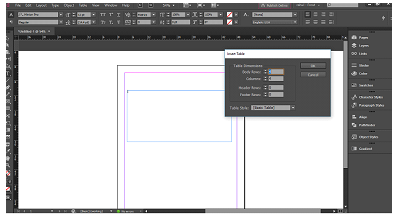
To be able to use table, first thing to know is how to create a table. To start with a table, create a new document or a layout. There are two ways for creating a table. First option is either go to table and create table or select the text tool, draw a box the size of the table needed, then to table and insert table. These two options bring two different table to the page. 

First Option:


Second Option:


Select the text tool, draw the box size of box needed for the table.
Click on the table, what can be seen is that the Option of Create Table has change to 
insert table. After inserting the table click on INSERT TABLE, and click on the text block.


After creating or inserting table, the table can be modified in many ways, such as changing the text, graphic, stroke & fills, rows & columns, and diagonal lines and the table. All these Settings can be seen in one place by going to Table, Table Option then Table Setup. 


Table is a very useful option in Adobe Indesign, as it can be also used not only for text, designing calendars, flyers, menu cards. Images can also be place by converting the cells into Graphic Box to place images that can be in books as an option of describing an image. 

One call can be graphic cell and the second one as the text cell for description. 


The Text cell can be converted by going to the menu bar, select Table, in the dropdown the option of convert call to Graphic cell is visible over there. 

After converting the cell to graphic cell, the square box changes to and can be seen a cross inside it.

To be able to insert a image in the graphic box, it is very simple, same steps, File > Place ( Ctrl+ D ) and the image is there. 

But in Graphic, first is to select the Graphic cell, then go to File > Place > select image from location, and Import. 


Conclusion: 
To conclude, table is a very useful option in Indesign as it allows the designer to create mark sheets, table of content, creating descriptions of images, arranging calendars date, keeping the same distance accordingly. Working with table is great. A non-user of Adobe Indesign can easily work with table just by importing the excel Spreadsheet into Indesign. This allow the user to make the modification in excel and just update the option in table, and the table is update, showing the modification shared.

Author Introduction: 

This is written by Gutteea Sharma who is pursuing Graphic Master Plus from ADMEC Multimedia Institute. This is blog is a part of his Adobe InDesign final project assessment. 

ADMEC Multimedia Institute is one of the prominent Adobe InDesign Training Institutes in Delhi which offers professional courses that plane as per the industry standard.

You can explore our Graphic Design Courses for more details.
Hope this blog would be helpful for you. If you have anything to share with us; you are free to leave it in the below-given comment area.

Tuesday, January 9, 2018

Best Accrediated Online Training Courses in Web and Graphic Design

Are you looking for valuable and proven courses in web and graphic design taught by professionals and experts at a very reasonable price. There is a huge variety of detailed, advanced, and online training courses that will prepare you with the skills and competencies needed to excel in this industry. 

These are particularly interesting because they not only provide industry based knowledge but also will inculcate in you the theoretical knowledge and ideas behind the different course structure.

Do you want to gain skills in graphic or web design but don’t have the time or money to get a degree or certification? So, if one want to gain extensive knowledge in terms of how to think like a designer, illustrator, web designer etc. to develop both broad and in-depth knowledge in professional, technical, or creative fields here, I am giving a solution.

Featured Graphic and Web Design Online Courses

With the rapid changes in the design industry such courses can be completed entirely online. Online training is either completed in the form of short term or through diplomas. When searching for any course, it is important to find that courses that are properly accredited with high rankings to ensure that they meet industry quality standards.

Have a look at some of the best and amazing short term and long term courses in graphic and web that can enhance the career of thousands of individuals who applaud them.  

Graphic Design Related Courses are Mentioned Below:

1. Graphic Master (8 Months)

This is the advanced program in print media that covers all the contemporary aspects of design industry related to computer software, art & sketching, digital painting, and production skills. This course will equip students with a knowledge on design, designing for print media etc.

2. Graphic Premium (6 Months)

The course will make you aware of the basics of various professional designing tools such as Photoshop, Illustrator, CorelDraw etc. right through basics to pro-level techniques. You will love to learn through our online training, with plenty of challenges to test your new skills with our experts. Along with this course, you will master Adobe Illustrator, Photoshop and will discover how to design for print media. This will also include ad campaigning, typography skills, and different aspects of design. 

  3. Adobe Photoshop Master (2 Months)

This is one of the most widely used industry standard image editing software, and is used mostly by creative professionals to enhance their digital images. It is a raster based program where data is depicted in the form of pixels and student will understand the different interface, tools, features, and image resolution, lay outing techniques, background designing, masking etc. 

4. InDesign (2 Months)
InDesign is a desktop publishing application that will make you learn making of different designs, layouts, and publishing of documents. Students who are interested in online InDesign course will learn how to design collateral materials for brands, working with fonts, adding images to relevant texts, formatting text, creating styles, adding graphics, and e-publishing. Our experts will tell you the steps useful for sending a design to the printing unit.

Web Design Related Courses are Mentioned Below:

1. Web Master (12 Months)

This is a long term diploma course in web site design and development that will introduce students to important web concepts, such as identifying the site's audience, navigation of websites, colors, fonts for a website. This program focuses on gui designing, ui development, and high level back-end programming concepts too. Later our experts will explain, web promotion using SEO and SMO with you and website optimization and user-friendly interface design techniques, domain & hosting types, uploading a website are few also to cover.


At the end we will guide you for your personal portfolio and interview too.

2. Web Premium (8 Months)

Through this advanced web design related course students will learn how to design professional level advanced UI for different types of websites and web applications. Image and code optimizations for faster websites, animation and maintenance, website customization's, uploading and much more are also covered under this course. 

Advanced web design scripting and programming would also be a part of this course which consists of Object Oriented JavaScript (OOJS), jQuery Plugin Development, DHTML, JSON, Basic PHP, MySQL, Ajax, and AngularJS .

3. Web Development Master (6 Months)


This course is very wonderful from our institute to become a successful UI developer and web developer so before opting for this programme, it is expected that one should have good knowledge of HTML5 and CSS3. This course will make you aware of the different concepts of website development that are crucial for creating different web pages using advanced programming languages like server-side logics JavaScript, jQuery, AJAX, Angular, PHP, MySQL, Server-side Scripting, Drupal, WordPress etc. 

Online or distance learning has opened numerous opportunities for career advancement and is a great way now-days for distance learning program that provides study to the students in a self-paced manner for time flexibility they need to balance work and studies. 

This online master degree open the way to new business opportunities by building networks of students with common goals.
Want to explore more and want to have more choices, check out more here. Studying a course at the diploma level means students will gain an in-depth knowledge in their chosen vocational area as well as building higher-level problem-solving skills.

Sunday, November 6, 2016

5 top applications for professional Graphic Designer

Graphic design applications are altering every year and graphic designers must be updated with latest technologies if they want to deliver spectacular work as per their client requirements.

These days, graphic design software is persistently being utilized to make visual communication more effective. By making use of these software, designers will have the option to organize and manage in a better way with various digital images, logos, clip arts and much more. If you want to deliver your work as a professional, then knowledge top application is a must.. We have listed some of the best graphic design programs here. Go through each of them and choose the one that suits your needs.

This software is ranked among the best software. It is a must for every graphic designer.
Uses:
  • Format vector images.
  • Creating illustrations and artworks.
  • Edit and resize images is extremely easy.
  • Copy Curve Segments feature allows reusing curve segments in projects.
  • Compatible with file formats, including AI, PSD, PDF, JPG, PNG, SVG, EPS, TIFF, DOCX, PPT and more
  • Work swiftly and proficiently with the added control from the Windows Real-Time Stylus pen-compatible tablets, like the Microsoft Surface, Wacom tablet and devices.
  • Includes 1,300 high-quality photos and illustrations, 125 fonts, 75 photo frames, 100 fills and more.
It is a raster graphics editing application developed and published by Adobe Systems.
Uses:
  • Enhance photos and images for use on websites
  • Create the backgrounds, site buttons and 3-D artwork.
  • Using a healing brush, clone stamp, patch tool photos can be modified.
  • For adding text effects using Strokes, drop shadows, bevel and emboss and other effects.
  • Remove unwanted content
  • For creating beautiful User interface designs and web pages.
It is a desktop publishing software application which works across desktop and mobile devices and produced by Adobe Systems.
Uses:
  • Create posters, flyers, brochures, magazines, newspapers, and books
  • Publish content appropriate for tablet devices in combination with Adobe Digital Publishing Suite.
  • Supports export to various formats like EPUB and SWF to create e-books and digital publications.
  • Also supports XML, style sheets, and other coding markup
  • Suitable for exporting tagged text content for usage in further digital and online formats.
It is a software for producing and editing complex page layouts in a WYSIWYG (What You See Is What You Get) environment.
Uses:
  • Produce layouts like single-page flyers and projects for magazines, newspapers, catalogs etc.
  • Supports professional typesetting preferences such as kerning, curving text along a line, and ligatures.
  • Provides features like easy layout synchronization, multiple undo/redo functionality.
  • Support for direct PDF import and output.
  • Multiple users can edit different areas on the same page.
5. Adobe Illustrator 2015
It is a vector graphics editor application developed by Adobe Systems.
Uses:
  • Create illustrations, charts, graphs, logos, diagrams, cartoons of real photographs both for print and digital media.
  • Import any image and use that image as a guide to trace and re-color a particular subject.
  • Easy conversion into a bitmap or jpeg image
In this era of rapidly-improving technology, there are always new tools coming up to comfort Graphic Designers stay on the cutting edge of design Industry. If you don’t know any of the above graphic design programs, then Graphic Design Institutes will help you get acquainted with these programs. Many graphic design Institutes offer diploma and certificate courses that are designed to help students to excel in the field of Graphic Design. Explore the best options available in the market and opt for the one which is as per your requirements.
Additionally, reading books, blogs, articles etc. related to the particular field will be helpful and always be willing to try and learn new things.

Featured Post

ADMEC Multimedia Institute Scholarship Program

The ADMEC Multimedia Institute scholarship program aims to select and trained talented non working female, married woman and non married m...